How I hardened SSH on my self-hosted Linux server when bots started brute forcing it
Table of Contents
Recently over December (2025); I was away on Christmas Holidays and had some free time to play around with my server and make some improvements on it.
I always had a thought lurking a the back of my mind to improve the security of my server, which I physically self host on an old school laptop. I'm not going to lie; that's one of the reasons I love Linux.
Paranoia setting in, time to check the logs...
The longer I thought on it, I eventually realized that with a no GUI Linux server, you don't really know what's happening on it, who's connected, who's doing what, etc..
So I started the hardening process, sat down with a cup of coffee and got to work.
I used this command (I connect over SSH to this server) to see what was going on and the result startled me a little...
sudo cat /var/log/auth.log | grep "Connection reset"

Notice all the different attempts within 1 day and those are servers mostly from Russia (based on the IPs) brute forcing common users and passwords to get into my server!!!
I don't know how long this exercise has been going on, but it ends NOW. Luckily I use an ssh-key to get into my server so I was safe, but not as safe without some hardening.
Locking down SSH and throwing away the key
I immediately started doing some research on securing SSH, I skimmed some articles, a few Youtube videos and asked uncle AI for its hopefully non-hallucinated opinion.
I found the path where the SSH config was stored on my Linux Distro (Ubuntu), here it is:
/etc/ssh/ssh_config- SSH Client config/etc/ssh/sshd_config- SSH Server config (One we want to edit)
Depending on the distro, they might name the ssh service ssh or sshd, so after some fiddling around on my server, it's ssh.
Opening the config file in vim and making sure that I don't close the current ssh session otherwise I'd be locked out of my server until I go home from holidays (not good) I opened a separate terminal session ready to test the changes.
These are the settings I changed / added in my ssh service config:
PermitRootLogin no

PasswordAuthentication no
KbdInteractiveAuthentication no

Port 2222

MaxAuthTries 3
MaxSessions 2
MaxStartups 5:30:10

ClientAliveInterval 300
ClientAliveCountMax 2

PubkeyAuthentication yes

PermitEmptyPasswords no
IgnoreRhosts yes
HostbasedAuthentication no
X11Forwarding no

MACs hmac-sha2-512-etm@openssh.com,hmac-sha2-256-etm@openssh.com,hmac-sha2-512,hmac-sha2-256

KexAlgorithms curve25519-sha256,curve25519-sha256@libssh.org,diffie-hellman-group-exchange-sha256

Ciphers chacha20-poly1305@openssh.com,aes256-gcm@openssh.com,aes128-gcm@openssh.com,aes256-ctr,aes192-ctr,aes128-ctr

HostKeyAlgorithms ssh-ed25519,rsa-sha2-512,rsa-sha2-256
Short and sweet on what this config does:
- no passwords or root user logins, only public key auth (ssh-key),
- max sessions and inactivity timeouts to prevent a session from hanging on forever
- modern crypto algorithms that are a lot more secure than the defaults.
The Ace up my sleeve against persistent bots: fail2ban
Bots aren't always the sharpest tool in the shed, but they can be quite persistent.
Which for me is quite annoying. Each failed attempt to login to my server results with what I like to call log pollution - I'm not too interested in seeing bots failing to login but rather more serious attackers trying.
Luckily I discovered a tool called fail2ban which can soft-ban or hard-ban users who keep failing to login via SSH. I use a security key to login with disabled passwords.
So, if bots or attackers keep failing, I would like to block them; not even allowing them the opportunity to fail to login.
After installing fail2ban, I setup the config here: /etc/fail2ban/jail.local and it looks like this:
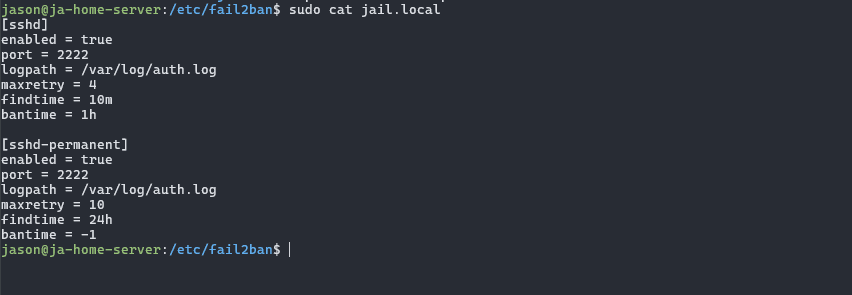
So, what that does is firstly a soft-ban for an hour if you fail to login after 4 tries, then a hard ban with 10 failed tries within 24 hours.
In my mind, after 10 failed attempts within a day - with a ssh-key based login setup, they aren't the right user to login to the server. It's someone who doesn't belong there!
Which naturally leads to me hard-banning them automatically. Easy win.
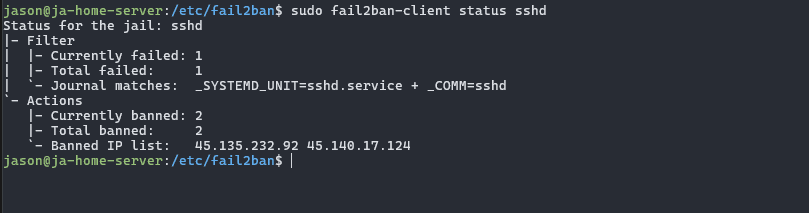
Here we can see 2 IP's already hard-banned, nice!. I used this command:
sudo fail2ban-client status sshd
Shifting the target (change SSH port)
Security through obscurity, not really super secure as more sophisticated scanners can find your SSH port, but helps against the majority of somewhat dumb bots on the net.
I only really did this to reduce the noise in my logs, if you don't mind some noise; then your perfectly fine not doing it.
Ending Note
It's a crazy world out there, especially on the internet. We're pretty safe behind firewalls but once you open the door it's really like a no-mans land or wild west and that is cool and scary at the same time.
Rather safe than sorry is a belief I hold onto and hopefully you enjoyed reading this post!
Till next time - stay safe on the net for my fellow self-hosters!